We support and strongly recommend you connect with one of the secure connections, in this case, using SFTP (FTP over SSH) as a security best practice.
You can also view our Filezilla Video Tutorials to: install and download, connect and transfer files, import connections and edit logs, and bookmarking and using multiple connections.
Host Key Fingerprints#
SHA256: RHzcESwK8M9HpQfuMLpHQjBb+yWMdDCs1IFEp5lkUVU
MD5 BASIC FORMAT:
RSA hostkey: bc9d86202d681a35bb9d5c41f4eb694c
DSA hostkey: ce2f1c9f870af0b33183995780aee9b6
MD5 HEX FORMAT:
DSA Hostkey : ce:2f:1c:9f:87:0a:f0:b3:31:83:99:57:80:ae:e9:b6
RSA Hostkey : bc:9d:86:20:2d:68:1a:35:bb:9d:5c:41:f4:eb:69:4c
Details#
| Ports (SFTP) | 22 | |
| SFTP Host | ftp.hostedftp.com or
yourdomain.hostedftp.com or ftp.yourdomain.com |
The Hosted~FTP~ service will connect your FTP client to the nearest location |
| SFTP
FileZilla Settings |
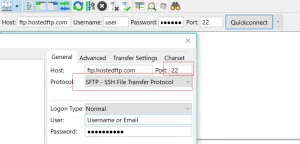 |
Example settings for using FileZilla FTP client secure transfer using SFTP
Note: |
| SFTP
Login Info |
Username
Password Default Remote Directory
|
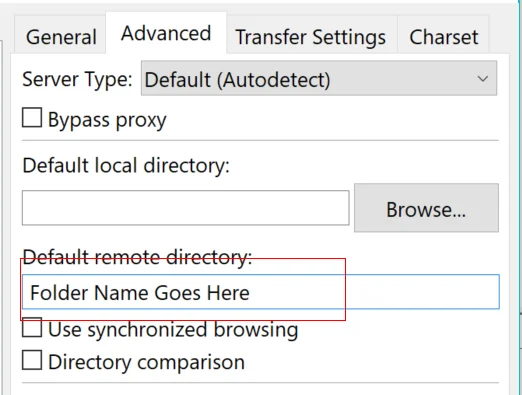
Aside from requiring a username and password for login credentials, SFTP requires a target folder to be set client-side. By clicking on the Advanced tab, input the folder directory you would like to access upon login. (see image)
Note: You do not need the entire folder path, naming the last folder is enough i.e. /upload |
| SSL “Unknown Host Key” message | 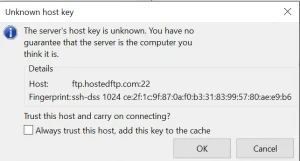 |
The first time you connect to the Hosted~FTP~ site with a username/password with SFTP the “Unknown Host Key” message may appear. This is a normal part of the SSL setup for
FileZilla and other SFTP clients/scripts Hosted~FTP~ is the owner of the host server: |
| Trust on first use (TOFU) | The TOFU (Trust on first use) security model is employed by SSH. (e.g. see this article) | Refer to these:
FileZilla client: links |